
Instabridge: WiFi Hotspot Map
Instabridge Sweden ABTravel & Local
4.241.43K Reviews
- Version
- 26.8.17
- Installs
- 100.00M
- Age Rating
- Teen
Screenshots
Our Review of Instabridge: WiFi Hotspot Map
 Analysis by Appyee
I judge a WiFi-finder app by whether it helps me make a better decision before I spend time walking to a hotspot. Instabridge: WiFi Hotspot Map is built around that practical question: where might I find a public connection nearby, and can I prepare before I get there? Its central draw is the hotspot map, backed by a community that shares network details. That can be genuinely useful when mobile data is limited, but I treat the map as a guide rather than a promise. A listed network still needs to be in range, working, and suitable for what I want to do.
What the map changes
Instabridge is a free travel and local app from Instabridge Sweden AB. It has an average rating of 4.2 from around four million ratings and has passed 100 million installs, which suggests that finding connectivity on the move is a common need. The useful idea is less “free internet everywhere” than a shortcut to checking possible public access points before asking around or relying on mobile data.
That distinction matters. A map can save me the awkwardness of asking for a password and help me plan a stop, but it cannot make a café’s router faster or guarantee that a business still offers access. I find the app most valuable when I use it to identify a likely option and keep a backup in mind, not when I assume every pin will work exactly as shown.
Finding Free WiFi Made Easy
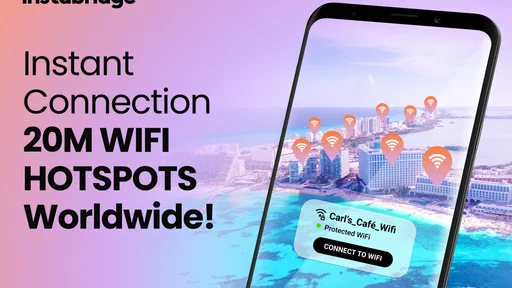
Let's face it, most of us are slaves to internet connectivity. Enter Instabridge, an app that connects you to millions of free WiFi networks around the globe. The idea is pretty genius: it's a community-driven platform where users share passwords to public WiFi hotspots. So, instead of pestering the barista for the password, you can simply open the app and voila! Instant access.
How It Works
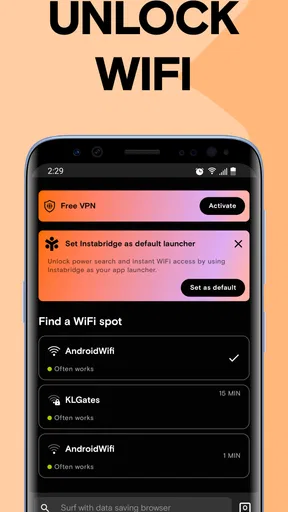
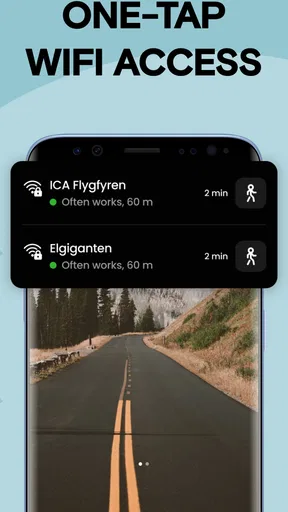
When you first download and open Instabridge, you'll notice how sleek and user-friendly the interface is. No unnecessary frills, just straightforward functionality. The app uses GPS to pinpoint your location and displays available hotspots on a map. You can see which ones are closest, and more importantly, which ones are open to connect.
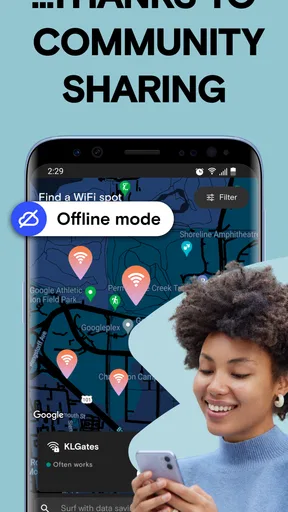
One feature that stands out is the offline map. Say you're traveling abroad and don't want to rack up data charges, you can download maps of your destination in advance. This way, you’ll have all the WiFi spots you need at your fingertips, even without an internet connection.
Planning around limited data
The offline-map idea is most useful when I prepare before leaving reliable internet. If I’m heading somewhere unfamiliar, I can look at the destination while connected and save the area for later. That turns the map into a small part of a travel plan rather than something I have to load at the exact moment I need it. I would still check the map before travelling and avoid assuming that an offline view confirms a hotspot is currently available.
A practical routine is to identify more than one nearby possibility, then use the first connection that is both reachable and appropriate for the task. A quick message or map check is a different need from a long video call or uploading large files. The app can help me find candidate networks, while the venue, signal and real-world performance determine whether a particular connection is worth using.
A Community That Connects
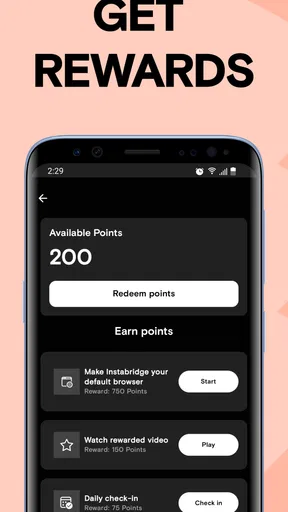
What makes Instabridge a standout is its community aspect. Users contribute by adding new WiFi passwords and validating existing ones. This helps ensure that the information is up-to-date and reliable. You can even earn points for sharing new hotspots, which gives a nice little incentive to participate.
And if you're worried about security, Instabridge has you covered. The app encrypts your data whenever you connect to a public network. It's like having your own security blanket while surfing the web.
Reading community information sensibly
Community-shared details are a strength, but they also create a trade-off: a password or hotspot note can become stale when a venue changes its network. If a connection fails, I would not keep retrying indefinitely or assume the business is at fault; I’d move to another listed option or ask staff whether guest WiFi is available. Treating contributions as useful leads, not guaranteed access, keeps the app helpful without making it the single point of failure in a travel plan.
I also separate finding a public network from deciding what to do on it. For sensitive tasks, I prefer mobile data or a network I trust, rather than assuming that a hotspot is safe just because it appears on a map. A connection tool can make access easier, but I still make my own judgement about where I sign in and what information I send.
Ease of Use
Using Instabridge is as simple as it gets. The app runs smoothly without any glitches, and I love that it doesn’t bombard you with ads. Just tap on a hotspot, and if it’s available, you’ll be connected without having to enter any passwords manually. It’s almost like magic!
The app also provides useful information like speed tests for each hotspot, so you know which ones to avoid if you’re in a rush. And if you're a data nerd like me, you’ll appreciate the usage statistics that show how much data you’ve saved using WiFi instead of mobile data.
When a hotspot is the right tool
For a short practical task, the map can beat searching the web for nearby cafés one by one: it starts with places where a connection may be available, rather than with a general list of businesses. That is especially handy if I need to send a message, check a route, or briefly get online while moving through a town. It is less compelling if I already have dependable mobile data, or if my priority is guaranteed bandwidth for work. In those cases, my carrier connection or a confirmed network at a specific venue is the simpler choice.
One small but useful habit is to think about the next step before connecting. If I only need to check directions, I can do that quickly and continue rather than settling in because a hotspot appeared on the map. If I need a longer session, I look for a place where staying is welcome and the connection seems adequate. That way the app helps me choose a stop, not just a network.
Everyday use and sensible alternatives
Imagine arriving in a new city with a low mobile-data allowance and needing to message someone the address of your accommodation. I would open the saved map, choose a nearby candidate, and keep a second option in mind in case the first network is out of range or its details no longer work. Once online, I could send the message and check the route. That is a realistic win: less wandering and less reliance on data for a brief task, without pretending the app removes every uncertainty.
Compared with relying only on a carrier’s coverage, Instabridge can point toward shared public access that a mobile plan does not provide. Compared with searching a general map for cafés, it focuses more directly on connectivity. But neither comparison makes it a replacement for a dependable data plan or a venue’s own current WiFi instructions. A carrier is usually better when I need a stable connection while travelling between places; asking staff is better when I am already inside a venue and need its current password.
It is also worth being realistic about what “offline” can do. A downloaded map can help me consult saved hotspot information without first loading the map over mobile data, but the phone still needs to be close enough to connect to a network, and saved information does not guarantee that a network is operating. I would download the relevant area while connected and use it as a planning aid, not as a promise of internet access in a place with no coverage.
Who gets the most from it
Instabridge is a better fit for people who often travel, move around dense towns, or try to stretch a limited data allowance than for someone who always has reliable mobile service. Students and commuters may find the map handy when they need a quick connection between destinations, while occasional travellers can prepare for an unfamiliar area in advance. Its value depends heavily on whether the places a person visits have useful community-listed hotspots; someone mostly in remote areas may see fewer relevant options.
The app is free to download, though it includes in-app purchases ranging from $0.99 to $94.99 per item. I would decide based on the hotspot map’s usefulness to my own routine rather than assume I need to buy anything. It is rated for Teen users, supports Android 6.0 and later, and its current version is 22.2026.02.08.1553. Those details make it easier to judge compatibility and suitability before installing.
My Personal Take
Before stumbling upon Instabridge, I was often left scrambling for WiFi in unfamiliar places. Now, I feel like I have a secret weapon in my pocket. It’s particularly handy when traveling, as it saves both time and money. Plus, knowing I’m contributing to a larger community by sharing WiFi spots gives me a tiny sense of heroism.
Of course, it’s not without its limitations. The availability of WiFi hotspots can vary depending on your location, and in less populated areas, you might find fewer options. But in urban centers, it's a real game-changer.
All in all, Instabridge: WiFi Hotspot Map is a must-have app for anyone who needs regular internet access on the go. Whether you’re a traveler, a student, or just someone who’s constantly hunting for WiFi, this app has got you covered. So go ahead, give it a try, and see how it transforms your connectivity experience!
Verdict
Strengths of Instabridge: WiFi Hotspot Map
- Easy access to free Wi-Fi networks worldwide.
- User-friendly interface for quick navigation.
- Battery-saving mode while searching for networks.
- Offline map feature for data conservation.
- Community-driven updates ensure accuracy.
Limitations of Instabridge: WiFi Hotspot Map
- Limited network availability in rural areas.
- In-app ads can be distracting.
- Requires GPS for optimal functionality.
- Some network passwords may be outdated.
- Privacy concerns with shared networks.
Other Releases by Instabridge Sweden AB
View All
Nova Launcher: Home Screen
Personalization3.2

Nova Launcher Prime
Personalization4.1
Similar Picks in This Category
View All
Google Maps
Google LLC3.4

Google Maps Go
Google LLC4.1

Booking.com: Hotels & Travel
Booking.com Hotels & Vacation Rentals4.8

Google Earth
Google LLC3.8

Skyscanner Flights Hotels Cars
Skyscanner Ltd4.8

trivago: Compare hotel prices
trivago N.V.4.4
Frequently Asked Questions
What is Instabridge: WiFi Hotspot Map, and how does it work?
Instabridge is a crowd-sourced WiFi hotspot locator that helps users find free WiFi connections worldwide. The app relies on a community of users who share the credentials of WiFi networks they have access to. It’s particularly useful for travelers and those looking to save on data usage by automatically connecting to available networks.
Is Instabridge safe to use for connecting to public WiFi?
While Instabridge provides access to various public WiFi networks, it’s crucial to exercise caution. Public WiFi can be less secure, so it's recommended to use a VPN to protect your data. Instabridge itself doesn't guarantee the security of the networks but offers a platform to connect easily.
Does Instabridge work offline?
Yes, Instabridge can work offline by downloading WiFi maps in advance. This feature is particularly beneficial when traveling internationally, allowing you to locate available WiFi without using cellular data. However, you must download the maps beforehand while you still have internet access.
How does Instabridge update its WiFi hotspot database?
Instabridge continuously updates its database through user contributions. As users connect to new WiFi networks, they can choose to share the credentials with the community. This collective effort ensures that the database remains current and helpful for users seeking free WiFi access.
Are there any costs associated with using Instabridge?
Instabridge is free to download and use, offering access to a vast database of WiFi hotspots at no cost. However, the app includes ads, and there may be in-app purchases available that offer additional features or an ad-free experience. Always check the app store for the latest pricing and subscription options.
